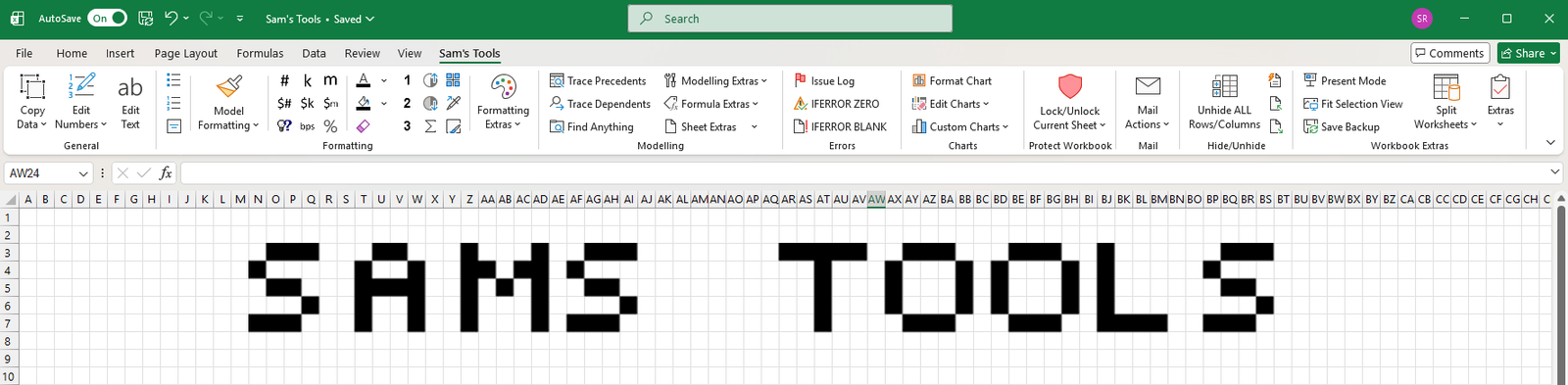
The Excel add-in I never intended to build
I’m a bit of an Excel nerd. I’ve spent most of my career working in finance and commercial roles, so naturally I’ve spent a fair amount of time in spreadsheets.
Over the years, I’ve found myself doing the same little tasks over and over again. Formatting cells, cleaning up data, tracing formulas, copying information between workbooks, and generally doing things that I thought should be a lot easier.
Being someone who enjoys finding ways to make things more efficient, I started writing little VBA macros to automate some of these tasks. Every time I came across something that was repetitive or unnecessarily time-consuming, I’d try to find a way to make it a one-click job.
That was over five years ago.
What started as a handful of macros gradually grew into a fairly comprehensive Excel add-in. I’ve continued adding to it over the years, mostly building things that I needed myself and occasionally coming up with ideas for things that Excel probably should have been able to do in the first place.
I’ve never really had any intention of turning it into a product. It’s just something I’ve enjoyed building and have ended up using pretty much every day.
So, what’s included?
The add-in has grown quite a bit over the years and now includes tools covering a range of different areas:
- Copy & Edit – Copy structured and unstructured data, create live snapshots that update with their source cells, and quickly edit text and numbers across selected ranges.
- Formatting – A collection of shortcuts for financial modelling formats, value formats (including dollars, basis points, percentages, thousands and millions), and applying custom brand colours to cells, tables and charts.
- Formula Auditing – Enhanced trace precedent and dependent tools to help follow formulas and understand how different parts of a model connect.
- Modelling & Formula Extras – A range of additional shortcuts and utilities to make building and working with financial models a little easier.
- Workbook Management – Tools to manage sheet protection, hide and unhide sheets, split workbooks into separate Excel or PDF files, and email selected worksheets rather than the entire workbook.
- Issues & Error Handling – Create an issue log to keep track of problems in a model, along with shortcuts for wrapping formulas in IFERROR.
- Other Extras – A few things that don’t necessarily fit anywhere else, including chart tools, an agenda template, calendar template, text-to-speech, motivational quotes and even a magic number game.
There are also a few smaller additions, including extra formatting options in the right-click menu and disabling the F1 key (which, if you’ve ever accidentally pressed it while working in Excel, you’ll probably appreciate).
It’s a bit of a mixed bag, but that’s probably a fair reflection of how it was built. Each tool has its own story and, more often than not, started with me getting frustrated about having to do something manually.
Why share it?
For the last five years, the add-in has pretty much just lived on my own computer. I’ve occasionally shared it with colleagues, but never really thought much about making it available more widely.
I figured there might be other people out there who spend a lot of time in Excel and would find some of these tools useful. There are plenty of great commercial Excel add-ins available, but not everyone has access to them or necessarily needs another paid subscription.
So I’ve finally spent some time tidying things up, documenting the features and making the add-in available on GitHub.
It’s completely free, and I’ve made the source code available as well. It’s currently designed for Windows versions of Excel.
You can find everything you need to get started, including the download and installation instructions, on GitHub.
Download Sam’s Tools on GitHub
I’ll continue adding to it as I come up with new ideas (or get frustrated by another repetitive Excel task).
If you give it a go, I’d be keen to hear what you think. And if there’s something you find yourself doing repeatedly in Excel that you wish could be automated, let me know. It might just end up being the next addition.
Happy Excel-ing!